
Link Rot Is Quietly Killing Your Old Content. Here's How to Audit and Fix It in 2026.
Two years of accumulated link rot can break 15-30% of the outbound links in your old content (Pew Research, 2024). Here's how to find them, fix them at the source, and prevent the next round.
The internet decays. Pew Research's May 2024 study tracking webpages from 2013 to 2023 found that 38% of decade-old pages are now dead, and 8% of pages from 2023 had already disappeared by year-end. The decay isn't linear. It compounds. Two-year-old content typically has 15-30% of its outbound links broken right now.
This is link rot, and it's the most-ignored maintenance problem in creator content. Blog posts you linked to get deleted. Product pages get restructured. Company sites get redesigned with completely new URL structures. Event pages expire. Domains lapse and get parked. None of this triggers an alarm. Your content just slowly degrades.
The cost is real and double-sided. Google's quality signals factor in outbound link health. Pages with high 404 rates get crawled less often and their perceived authority compounds slower over time. Audiences that click a dead link in your post lose trust in the rest of the recommendations on that page. And the rot itself compounds: once enough of your old content has dead links, going back to fix them feels insurmountable.
This piece is about how to run a real link rot audit in under an hour, fix the breakage at the source, and prevent the next round.
Why the rot accelerates in 2026
Three structural reasons.
Site migrations are constant. Companies are still moving from legacy CMS platforms (WordPress, custom builds) to modern frameworks (Next.js, Astro, headless setups). Every migration is a chance to break URL structures. Most marketing teams don't set up exhaustive 301 redirects from old paths.
Brands churn faster. Startups die. Products get sunset. Companies pivot. Domains expire. The mean time-to-failure of a referenced URL has been compressing for a decade.
Citation density is climbing. Modern blog posts, knowledge bases, and AI-summarized articles cite more external sources per published page than the same content did five years ago. More citations means more surface area for rot. A 2,000-word post with 15 outbound links has 3x the rot exposure of the same post with 5. The typical content density on creator sites has moved in exactly that direction.
The four kinds of link rot
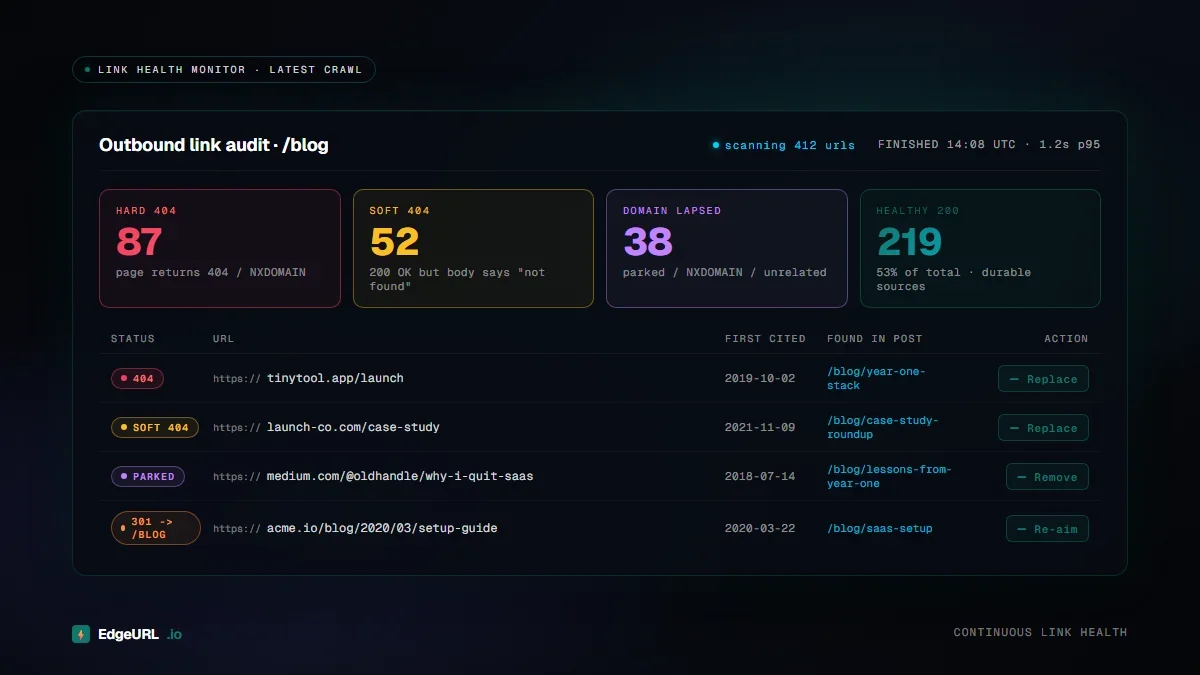
Audits should distinguish between four failure modes, because the fix is different for each.
1. True 404s: the page is gone
The destination URL returns a 404 (Not Found) status. The page no longer exists.
Fix: Find a replacement source if the topic is still relevant. If it's not, remove the link and rephrase the surrounding text.
2. Redirected to a non-equivalent page: the page moved but to something different
The destination URL redirects (301 or 302) to a different page that doesn't match what you originally linked to. Common when a company restructures its site and replaces specific articles with category pages.
Fix: Update the link to a more specific, current page that matches the original intent. If no equivalent exists, treat as a 404 and remove the link.
3. Domain lapse: the entire site is gone
The domain returns NXDOMAIN, a parking page, or a totally unrelated site (because the domain was bought by someone else).
Fix: Remove the link and ideally find an equivalent source on a still-living site. Domain lapses are usually permanent.
4. Soft 404s: the page loads but says "not found"
The server returns 200 OK but the page content is a "Not Found" or "This page no longer exists" message. This is the worst kind because automated crawlers often miss it.
Fix: Same as a true 404. Find a replacement or remove the link. The challenge is detection, which usually requires either manual review or specialized auditing tools that look for soft-404 indicators.
The audit process: 60 minutes to a complete picture
The process below works for content libraries up to ~500 articles. Beyond that, automation matters more.
Step 1: Inventory your links
Pull a list of every outbound link in your content. For most creator setups:
- Blog posts: most CMS platforms can export a CSV of posts with their content
- Bio page: list every link manually (usually <30)
- Email signatures: usually 1-3 links
- QR codes: list every active QR code's destination
- Old short URLs: pull from your URL shortener's dashboard
Step 2: Run an automated link checker
Plenty of free tools do this. Some good options:
- W3C Link Checker (free, slow but thorough)
- Screaming Frog (free up to 500 URLs, paid above)
- LinkChecker (free, command-line)
- Custom scripts using
curl -Ifor status codes
Step 3: Manual review of suspicious links
The automated check catches most failures but misses:
- Soft 404s (server says 200 but page is empty/error)
- Domain transfers to unrelated sites
- Pages that load but have completely different content than originally linked
Step 4: Categorize each broken link
Group your broken links into:
- Replace with equivalent: broken link, but a current page on the same site (or another site) covers the same topic
- Replace with archive: if the original page was important and there's an archive.org snapshot, link to the archive instead
- Remove and rewrite: the link can't be replaced, so the surrounding text needs to be edited
Step 5: Fix and republish
For each broken link, update the source content. Most CMS platforms make this easy. Search for the broken URL across all posts, replace with the new one or remove.
For email signatures and printed materials with QR codes, the fix is usually to update the underlying short URL (so the QR code still works but points somewhere new).
How to prevent the next round of rot
Three practices that reduce future rot without eliminating it.
1. Use managed short URLs for everything you can
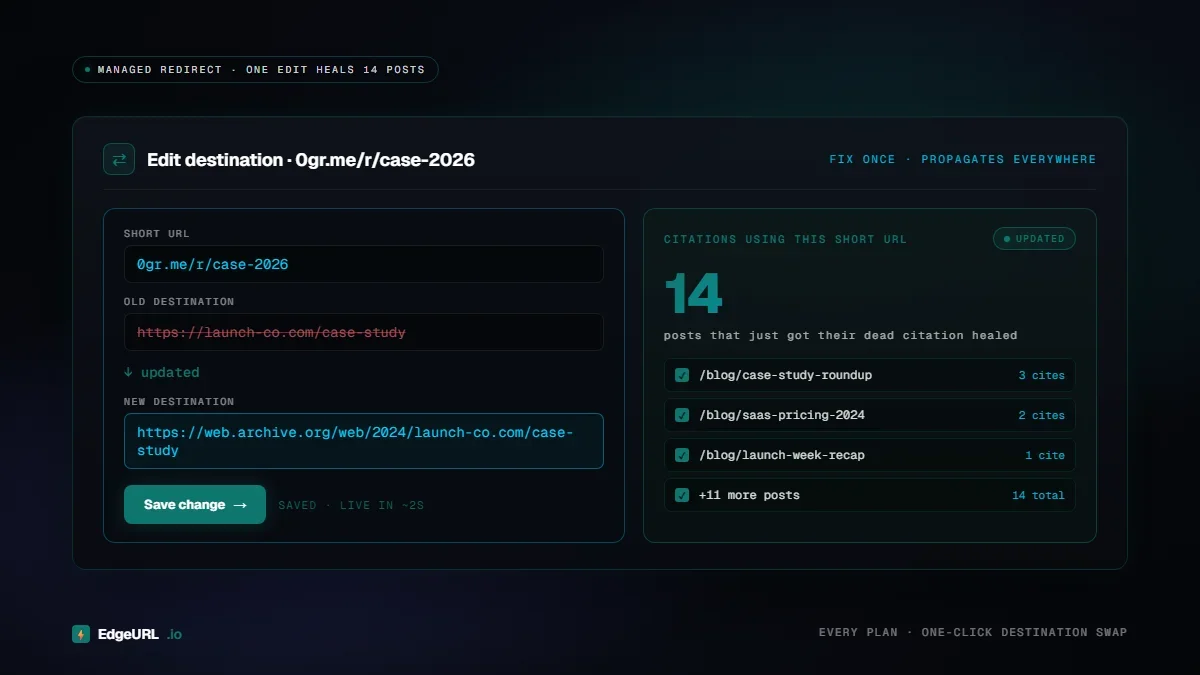
Every link you put in content should ideally be a managed short URL you control, not the raw destination. The reason: when the destination breaks, you can update the short URL once, and every piece of content that references it suddenly works again.
This is the single highest-leverage rot prevention move. EdgeURL (and any decent shortener) lets you change the destination of an existing short URL without changing the short URL itself.
The trade-off: short URLs are slightly less readable than full URLs in print, and some readers distrust them. Use a custom domain (links.yourbrand.com) to mitigate the trust issue.
2. Monitor link health continuously
Set up an automated link checker that runs weekly or monthly across your content library. Most CMS platforms have plugins for this. EdgeURL includes link health monitoring on Pro plans. Broken destinations get flagged in the dashboard before audiences hit them.
Continuous monitoring turns rot from "huge periodic audit" into "manageable weekly maintenance".
3. Prefer durable sources
When possible, link to:
- Official documentation pages (these change less than blog posts)
- Wikipedia (entries persist)
- Archive.org snapshots (immortal)
- Major brand sites (less likely to disappear than indie sites)
- Personal blogs that may not exist in two years
- Tweet links (Pew found nearly 1 in 5 tweets disappear within months)
- News articles behind hard paywalls (often re-organized or removed)
- Marketing landing pages (these get retired or restructured constantly)
What this is worth
The cost of running this audit is one focused afternoon every six months, plus another hour or two for fix-up. The benefit:
- Better SEO (Google quality signals improve)
- Better audience experience (no dead-end clicks)
- Better content longevity (old posts keep working as evergreen traffic)
- Smaller "compound rot" problem to deal with later
Tools and templates
For creators who want a starter audit:
- Export your blog post URLs to a CSV
- Use W3C Link Checker for small libraries
- For larger libraries, Screaming Frog has a free tier (500 URLs) that works for most creator sites
- EdgeURL Pro plans include link health monitoring at the platform level for any short URLs you create
The bigger picture
Link rot is one of five link-health problems that quietly drain creator traffic. Our broader piece, Link Hygiene: The SEO Practice That 90% of Creators Ignore, covers redirect chains, parameter-stuffed shorteners, missing UTMs, and the other failure modes that compound with rot. If this audit was useful, the link hygiene umbrella is where to start a quarterly checklist.
The 2026 case for getting this right
As AI search and LLM-based summarization become primary discovery surfaces, the link health of your content matters more than it ever did for traditional SEO. AI agents that summarize your articles will note when citations are broken. AI search results will be skeptical of pages with high outbound link failure rates.
Link hygiene is no longer a nice-to-have. It's a quality signal that compounds in the same way SEO does. Visible to algorithms, invisible to most humans, and very expensive to ignore.
Run the audit. Fix the breakage. Set up the monitoring. The cost is one afternoon. The benefit lasts as long as your content does.