
Custom Domain SEO: Why Linktree Is Quietly Stealing Your Domain Authority in 2026
Every social bio that links to your Linktree page is a backlink to Linktree's domain, not yours. The compounding cost over a creator career is enormous. Here's the math and the fix.
Most creators don't think about backlinks. Most creators have a Linktree page. These two facts combine into one of the most quietly expensive defaults in the creator economy.
When your Instagram bio links to linktree.com/yourname, you're not just sharing a link — you're handing Linktree a backlink from a high-authority domain (Instagram). Same for your TikTok bio. Same for your YouTube description. Same for any guest post or directory listing where you've shared your bio link.
Multiply by 5-7 social platforms, then by months or years of audience growth, and you've sent hundreds or thousands of backlinks to a domain you don't control. Linktree gets the SEO compounding. You don't.
Switching to a custom domain bio page is the single highest-impact SEO move most creators can make in 2026. It takes about five minutes to configure once the domain is purchased. And it's almost universally skipped.
This piece is about why, the math behind why it matters, and how to actually do it.
The mechanism: how bio link backlinks work
Search engines treat links as signals of authority. When a high-authority domain (instagram.com, tiktok.com, youtube.com) links to another domain, that link transfers a portion of authority to the destination.
Bio links are unusually high-quality backlinks because:
- They live on a high-authority source. Instagram and TikTok are top-1000 domains globally. A single backlink from one of them is worth dozens of backlinks from a typical content site.
- They're persistent. Unlike a tweet, a bio link sits on the profile indefinitely. The backlink keeps generating signal for as long as the profile exists.
- They get crawled often. Major social platforms get crawled constantly. Your bio link gets re-evaluated by Google's crawler more often than most pages on your site.
- They're branded. A bio link is the equivalent of a "homepage" link in SEO terms — the most valuable kind of link a site can have.
linktree.com instead of yourbrand.com, the cumulative SEO benefit accrues to Linktree.
What this looks like over a creator career
Run the numbers across a five-year creator career.
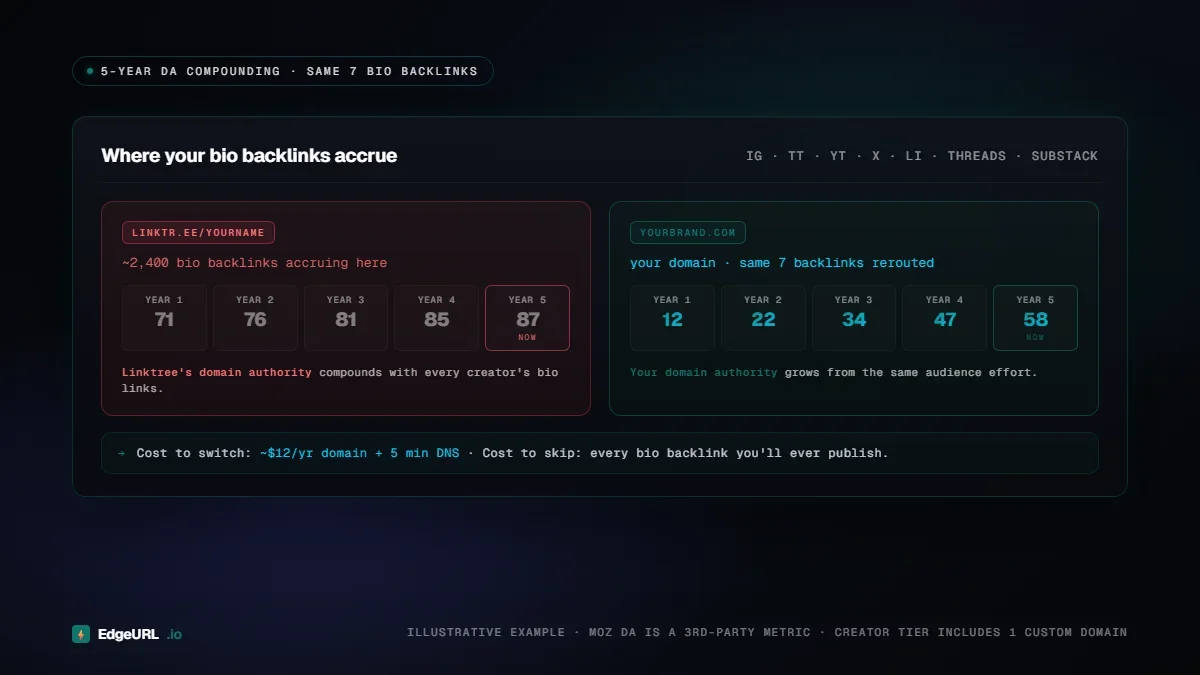
A creator with bios on Instagram, TikTok, YouTube, X, LinkedIn, Threads, and Substack — seven platforms — has seven bio backlinks live at any moment. Across five years, with profile updates and re-crawls, those seven links produce thousands of effective backlink signals.
If those backlinks all point at linktree.com/yourname:
- Linktree's domain authority compounds with every creator who does this
- Your own domain (if you have one) gets nothing from this surface
- Your branded searches don't rank because there's no SEO signal pointing at your domain
- Your portfolio site, blog, store, anything else you publish has to start from scratch
yourbrand.com/links or a subdomain of yours:
- Your domain authority compounds
- Your branded searches start ranking on Google
- Future content you publish on the same domain inherits the accumulated authority
- A potential client searching your name finds your stuff first, not Linktree's
The "but the bio link is just a redirect" objection
Sometimes creators argue that bio links don't matter for SEO because they're "just" redirects to the destinations. This is wrong in a specific, technical way that's worth understanding.
A bio link page (Linktree, EdgeURL bio, Beacons, Stan, etc.) is not a redirect. It's a real HTML page with content, indexed by Google, that displays multiple links and a creator bio. Google crawls and indexes these pages.
The destinations linked from the bio page are then secondary backlinks from the bio page itself. Their authority depends on the authority of the bio page domain.
If the bio page is linktree.com/yourname, it inherits authority from linktree.com (high) and passes a portion of that to the destinations. Net result: your destinations get some authority transfer, but most of the original backlink value sits on the Linktree page itself.
If the bio page is yourbrand.com/links, it inherits authority from yourbrand.com (yours, growing) and passes a portion to your destinations. Net result: your destinations get authority from a domain you control, and the bio page itself contributes to your overall domain authority.
The "just a redirect" framing is technically inaccurate. Bio pages are real, indexed pages, and they matter to SEO whether their owners realize it or not.
The cost of the switch
A custom .com domain costs $10-$15 per year at most registrars. Other TLDs vary widely: .io typically runs $30-$75 per year on renewal (at Namecheap, name.com, or other major registrars), .co and .app sit in the $20-$30 range. For most creators the cheapest-and-cleanest play is a plain .com -- both Namecheap and name.com sell .com domains for $10-12/year with clean DNS dashboards. EdgeURL Creator tier ($15/mo) includes one custom domain, so your marginal cost is just the domain itself.
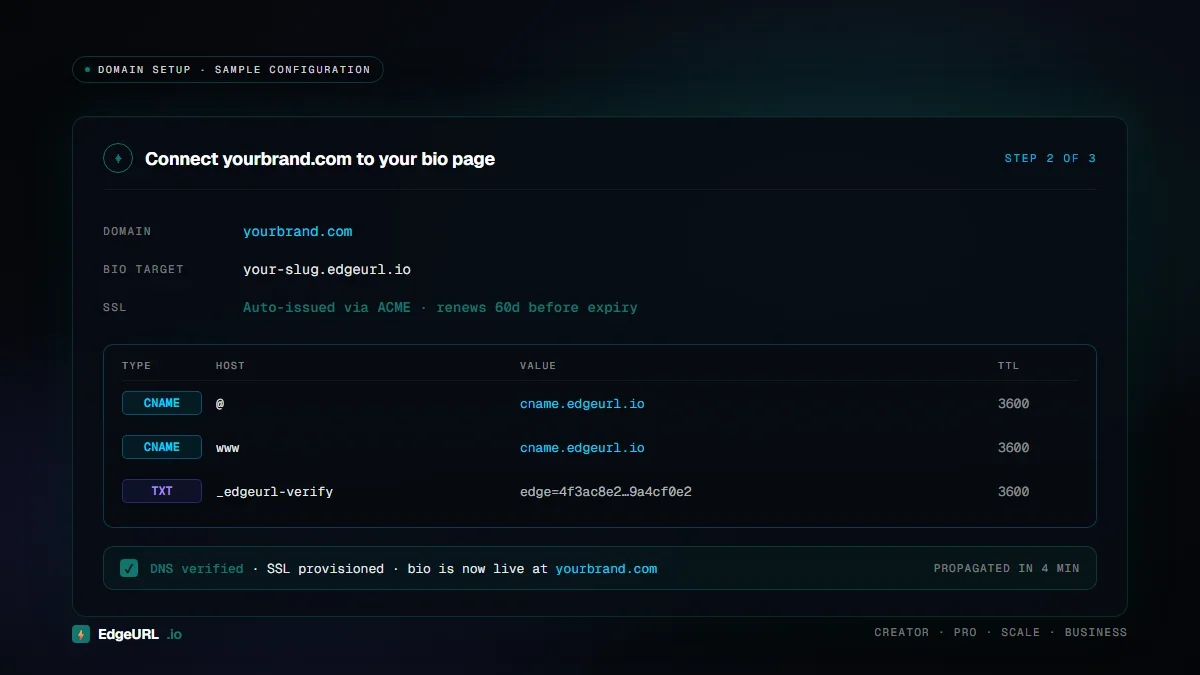
DNS configuration takes about five minutes. Most providers (Namecheap, name.com, Cloudflare) have one-click setups. For a subdomain (links.yourbrand.com) you add a single CNAME record pointing at EdgeURL. For a root domain (yourbrand.com) you add an A record instead, or an ALIAS / CNAME-flattening record if your registrar supports it (per DNS RFC 1912, a CNAME cannot live at a zone apex alongside other records). EdgeURL's onboarding checks the DNS for you and tells you exactly what to paste.
Connecting the domain to your EdgeURL bio page is a settings toggle and a verification step. The whole flow is under 30 minutes for someone who's never done it before.
The switch is not technically hard. The reason it doesn't happen is that creators don't realize the cost of not doing it.
Migration without breaking your audience
If you've been using a third-party bio link tool for a while and have audience trained to a specific URL, the migration plan matters.
Step 1: Buy your domain and set up the new bio page. Don't change anything on your social profiles yet.
Step 2: Make sure the new bio page works at both URLs. EdgeURL serves your bio page at both your edgeurl.io URL and your custom domain simultaneously. This means your old social bio links keep working while you transition.
Step 3: Update your highest-traffic platform first. Whichever platform sends you the most clicks should point at the new custom domain on day one. The rest can roll over throughout the week.
Step 4: Monitor click-through rates during the transition. A 5-10% drop is normal as the audience habituates. A 20%+ drop is a sign that something is broken — the new domain isn't loading, the SSL isn't working, etc. Diagnose immediately.
Step 5: After 30 days, redirect old URLs. Once the new domain is fully indexed and your audience has adapted, set up redirects from the old short URLs (if you used a third-party shortener) to the new custom-domain equivalents. This preserves any external links pointing at the old URLs.
The migration is incremental and safe if done in this order. Hard cutovers cause the audience drop-off; staged rollovers don't.
What about subdomains versus root domains?
Two valid setups:
Subdomain (recommended for most): links.yourbrand.com — this lets you keep your main site (yourbrand.com) for whatever else you do, and points the bio link at a dedicated subdomain. Easier to set up. Google's John Mueller has stated repeatedly that subdomains and subfolders are treated equivalently for ranking, so the SEO trade-off versus the root domain is closer to zero than the older "subdomains lose authority" rule of thumb suggests.
Root domain: yourbrand.com — this puts your bio page at the very top of your domain. Maximum SEO benefit. Constrains your main site to either be the bio page itself, or be at a subdomain like www.yourbrand.com or home.yourbrand.com.
For creators whose only web property is their bio page, the root domain setup makes sense. For creators with a separate site, blog, or store, the subdomain is usually better.
What this isn't
A few honest caveats:
This isn't a magic ranking boost. Custom domain bio pages don't make your site rank for unrelated queries. They build authority that compounds over time, with the biggest payoff being branded searches and queries directly relevant to your niche.
This doesn't help if your bio page is still on a third-party domain even with a custom URL. Some bio link tools let you "set" a custom domain but actually keep the page hosted on their domain via reverse proxy without true ownership. This still leaks SEO. Verify that the domain actually serves your bio content directly.
This won't matter for creators who never share links. If you've genuinely never put your bio link in any social profile, the SEO consideration doesn't apply. But that's a small population.
How to verify your current setup
Run this check:
- Open your most-used social profile.
- Click your bio link.
- Look at the URL bar of the resulting page.
- Is the domain in the URL one you own? Or is it a third-party tool's domain?
The compounding case for switching today
The longer you wait, the more backlinks you've sent to the third-party domain that you'll never recover. Every month of delay is a month of compounding lost.
The switch costs $10/year for a domain plus 30 minutes of setup. The return is your domain becoming the SEO surface that all your social distribution points at, instead of someone else's.
If you've been creating for more than six months and you don't have a custom domain bio page yet, this is the highest-leverage 30 minutes of work you can do this week.
Set up a custom domain on EdgeURL Creator, point your bios at it, and let the compounding start running for you instead of against you.