Bluesky lets you set any domain you own as your handle — @you.com instead of @you.bsky.social. It's a clean signal of identity ownership, and the only place you actually appear "verified" on a federated network without paying anyone.
But what if you don't own a domain?
Until this week, your options were:
- Buy a domain ($10-15/year) and configure DNS — if you understand what a TXT record is.
- Stay on
.bsky.social forever.
Neither great. So we shipped a third option.
EdgeURL is now an AT Protocol handle host
Set your Bluesky handle to your-slug.edgeurl.io for free. EdgeURL publishes your DID document at the address Bluesky checks. No DNS to configure, no monthly fee, no separate app to install. You keep full custody of your DID — we just host the resolution endpoint.
It's free on every plan, including the Free tier.
How it works (the 30-second version)
Bluesky resolves a custom handle by GETting https:///.well-known/atproto-did and reading the body as your DID. EdgeURL hosts that endpoint for every profile that opts in. When you set your bsky handle to your-slug.edgeurl.io, Bluesky hits your-slug.edgeurl.io/.well-known/atproto-did, sees your DID, and approves the change.
You keep custody of the underlying DID — it lives on Bluesky's PLC directory or your own PDS. EdgeURL only hosts the resolver, not the identity itself. Revoke the bridge or close your account, and your handle simply reverts on bsky.app's side.
Setup: 3 steps
1. Find your DID
In the Bluesky app or bsky.app: Settings > Account > Advanced > Account DID. It looks like did:plc:abc123....
Faster path: if your bsky handle is already verified on EdgeURL, the profile editor has an Auto-fill button that pulls your DID directly from Bluesky's public resolver.
2. Enable the bridge in EdgeURL
Go to /dashboard → your profile → Edit → Social tab. The Bluesky AT Protocol Bridge panel sits at the top.
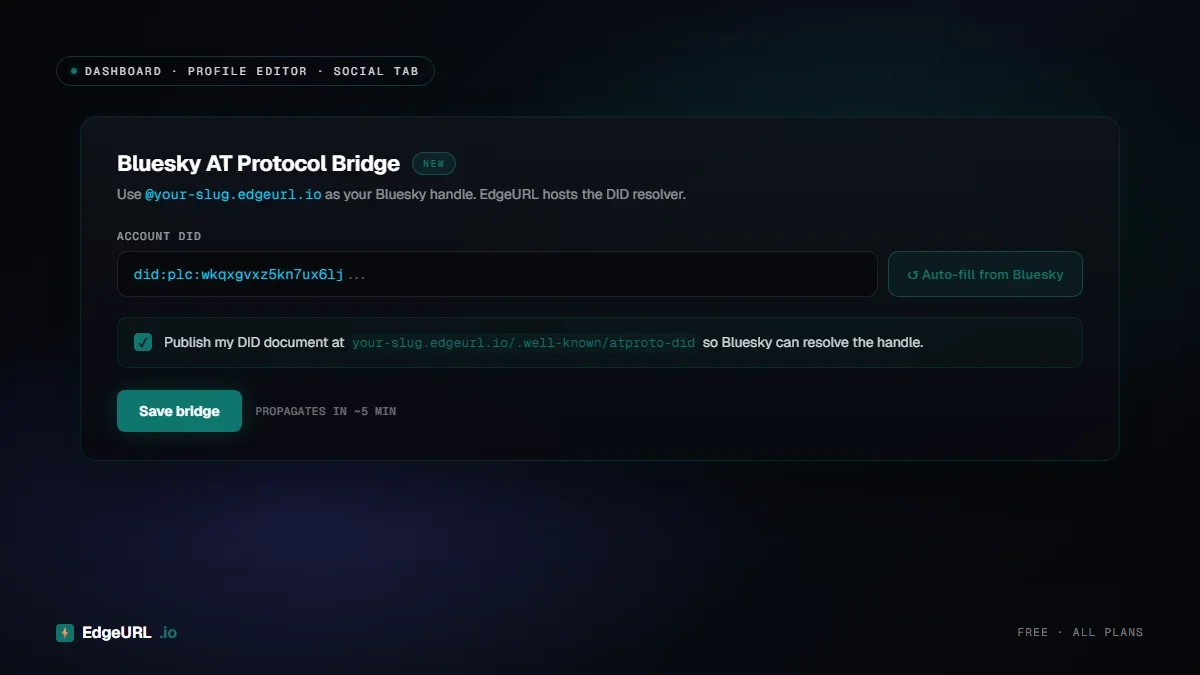
Paste your DID (or hit Auto-fill), tick the publish checkbox, click Save bridge. EdgeURL is now serving your DID at your-slug.edgeurl.io/.well-known/atproto-did.
3. Change your handle on bsky.app
Open bsky.app → Settings → Account → Handle → I have my own domain. Type your-slug.edgeurl.io in the domain field.
Then — and this is the only confusing part of the entire flow — switch to the "No DNS Panel" tab.
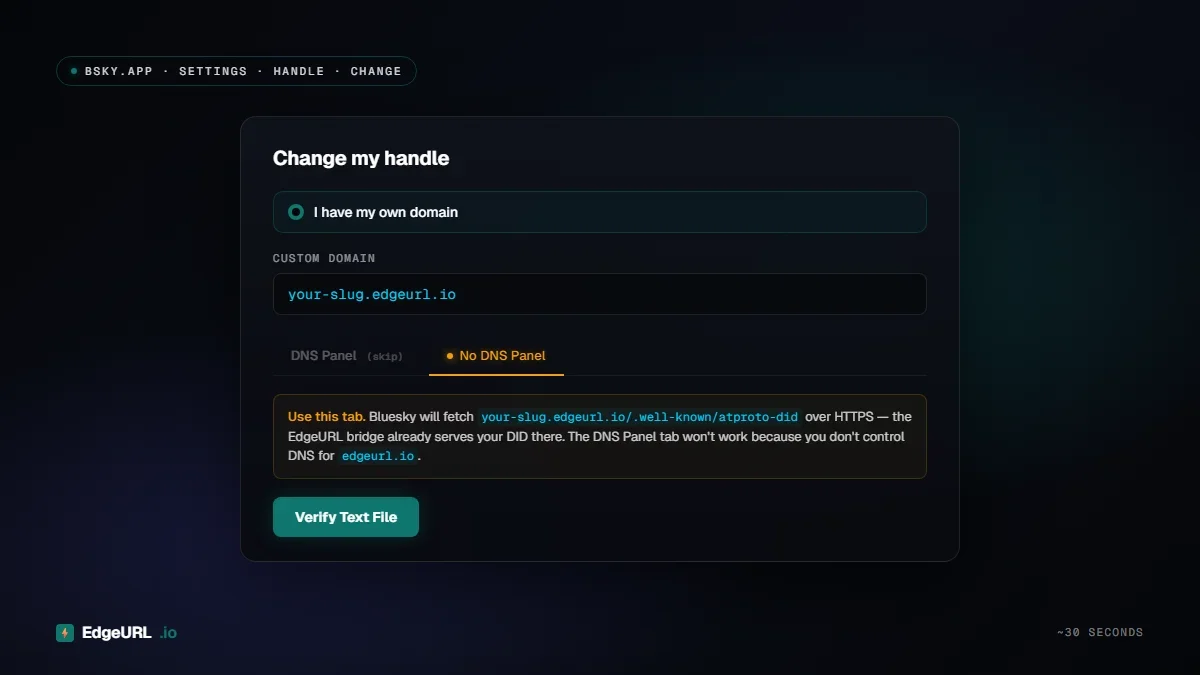
Bluesky defaults to the DNS Panel tab and asks you to add a TXT record. That flow won't work because you don't control DNS for edgeurl.io. The No DNS Panel tab uses an HTTPS file lookup instead, which EdgeURL is hosting for you.
Click Verify Text File. Bluesky fetches your DID, applies the handle change, and you're done.
Verify it's working
curl https://your-slug.edgeurl.io/.well-known/atproto-did
-> did:plc:abc123...
Returns 404 if the bridge is off or no DID is set. Cache TTL is 5 minutes — if you change your DID, give it that long to propagate.
Why we built this
The AT Protocol team designed handle resolution to be portable on purpose. Anyone can host the resolver. Most people running Bluesky don't own a domain and aren't going to learn DNS — that's a real friction in adoption.
Hosting the resolver is essentially free for us (one DB row, one cached endpoint per user). What we get out of it is a credible position as an AT Protocol host that pairs with our existing social-identity story. What you get is a clean handle for $0.
FAQ
Will EdgeURL ever charge for this? No plan to. Storage cost is rounding error.
Who controls my identity? You do. The DID lives on Bluesky's PLC directory or your own PDS — not on EdgeURL. We host only the public resolver record. If we vanish tomorrow, you switch your handle back and your account is intact.
Can I revert? Yes. Bluesky handle changes are reversible. You can switch back to @you.bsky.social from the same Settings panel any time.
Can I use my own domain instead? Yes — that's the standard Bluesky flow and EdgeURL still supports custom domains for your bio profile (Pro+). The bridge is for users who don't own a domain or just want a clean shared one.
What if I delete my EdgeURL profile? The resolver returns 404. Bluesky will eventually flag the handle as unresolved — give yourself a window to switch back to your previous handle on bsky.app first.
Get started
- Sign up at edgeurl.io/signup (free, all plans support the bridge).
- Find your DID in
bsky.app > Settings > Account > Advanced > Account DID.
- Enable the bridge in your profile editor's Social tab.
- Change your handle on bsky.app, No DNS Panel tab.
Detailed reference:
/docs/atproto-bridge.
